1st Step | New Applicant - Choose School, Intake & Programme
Application Guide
Application Guide
Follow the steps outlined in this guide to apply.
Before you begin, ensure that you know the programme you wish to apply
for and the
school under which the programme is offered. This information is
available on the
University
of Zambia
website.
- Know the programs you are applying for and the schools they are under. You may submit upto three (3) choices.
- Provide accurate and verifiable information. Know your postal address, residential address etc
- Contact information such as email addresses and phone numbers should be currently in use
- Provide clear and legible copies of the following documents to
support your application. Such as:
- Recent passport-size photograph
- Copy of your NRC or Passport
- Copies of your academic qualifications (e.g. ECZ O-Level, Cambridge, Diploma etc)
- (If applicable) Proof of staff child status
- Pay a non-refundable application fee of ZMW 150 for Zambian/SADC nationals or USD 60 for international applicants. (See Step 5)
Use the checklist below:
The application process consists of six (6) steps, as outlined below. Complete each step in full before moving to the next:
- Step 1: New Application
- Step 2: Personal Information
- Step 3: Qualifications and Supporting Documents
- Step 4: Programme Choices
- Step 5: Application Payment
- Step 6: Submission Review
After completing step one, your application will be saved and an email will be sent to
you containg your new Applicant ID and further instructions.
Please Note this does not mean you have completed you application.
You
may pause filling in your application at any time and pick up where you left off by
using your applicant ID to retrive your saved application.
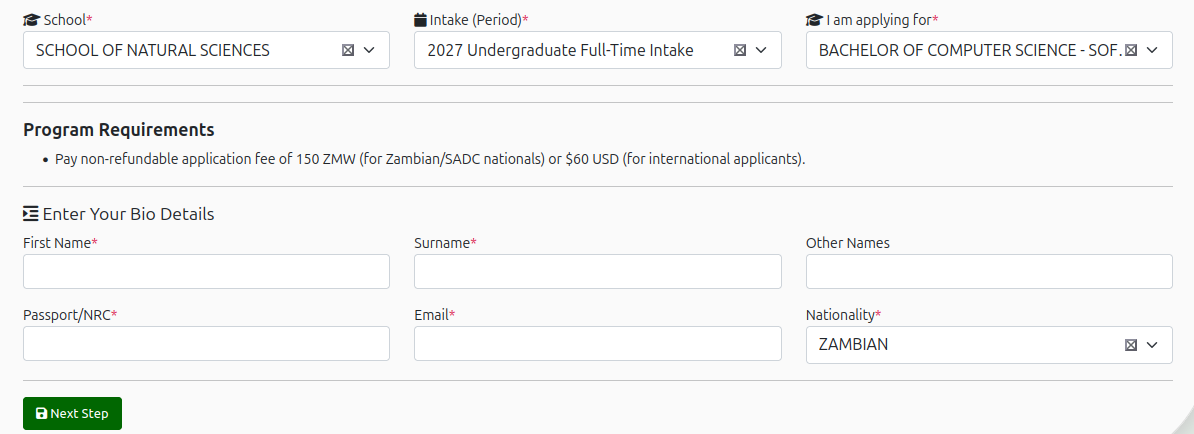
Step 1 | New Application
Select the following to start the process
- School: The school in which you will the select the program of study
- Intake (Period): The intake or period you are applying for. Select the one applicable.
- Programme: The program you wish to study. Select the one applicable.
You then will be required to enter your bio data. Enter all the feilds that are required.
After click Next Step This will save your information and move you to
the next step.
You will recieve an email with your new Applicant ID and further
instructions.
You
may pause filling in your application at any time and pick up where you left off by
using your applicant ID to retrive your saved application.
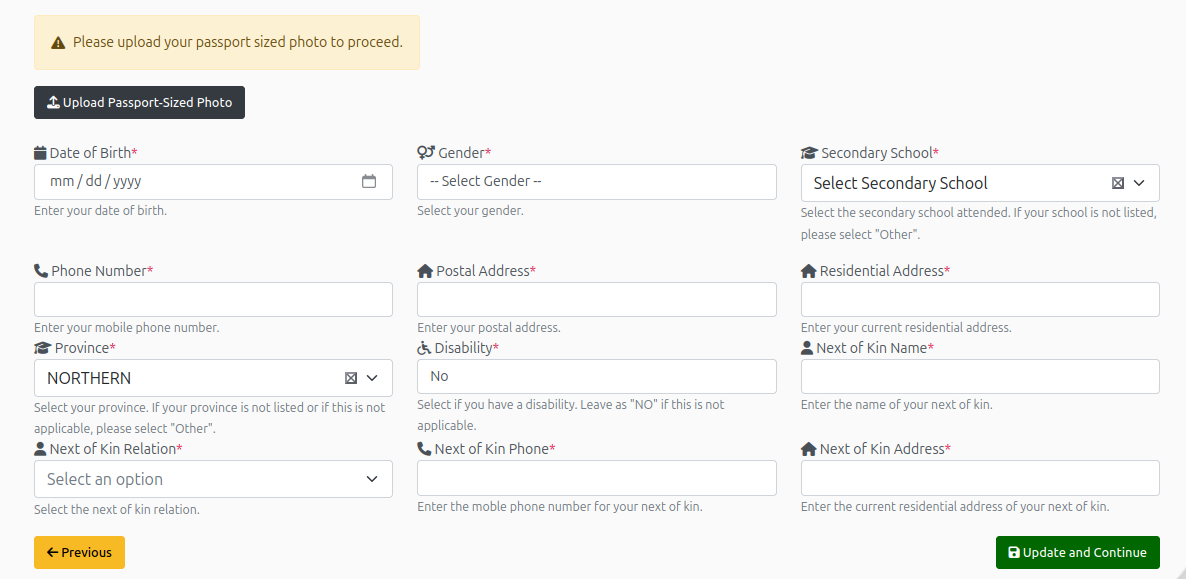
Step 2 | Personal Details
- Upload a recent passport-size photograph. A preview will be shown before upload.
- Next, fill in the personal details feild.
- Feilds with the * are required, you cannot proceed untill you fill them in.
- Select Other on any options that dont apply.
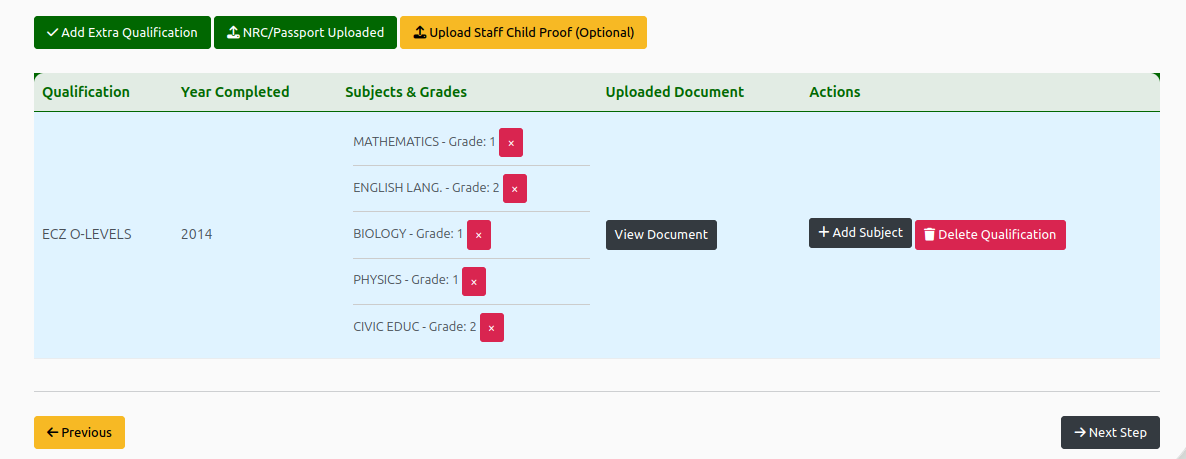
Step 3 | Qualifications and Supporting Documents
- Here you will be requred to enter your academic qualications to support your application.
- For qalifications such as ECZ O-Level & Cambridge, you are reqired to enter the subjects and grades as they appear on the document.
- You should also provide clear and legible copies of the following documents to
support your application. Such as:
- Recent passport-size photograph
- Copy of your NRC or Passport
- Copies of your academic qualifications (e.g. ECZ O-Level, Cambridge, Diploma etc)
- (If applicable) Proof of staff child status
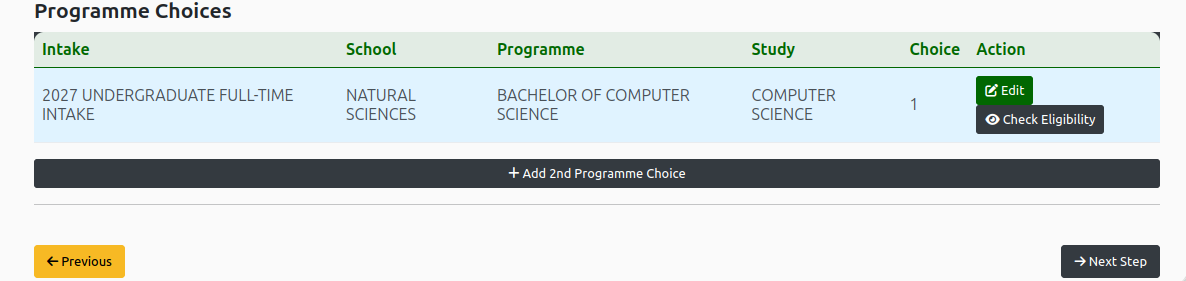
Step 4 | Programme Choices
Fill in your personal and contact information carefully.
- Review the programs you are applying for. You may submit upto three (3) choices.
- If you would like to find more programs to apply for, this information is available on the University of Zambia website.

Step 5 | Application Fee
- You are reqirerd to pay a non-refundable application fee of ZMW 150 for Zambian/SADC nationals or USD 60 for international applicants. (See Step 5)
- You may pay using your bank card. clicking the Pay Online button will redirect you to a secure checkout page where you will be required to enter you information. after wich you will be redirected back to the application page and a recipt will be sent to the email you provide.
- Or, click the Deposit Slip button to download a Bill Master pdf document that can be used to deposit money at a Zanaco Bank branch.
- Once processed, this page will indicate that you have made the payment successfully.

Step 6 | Submittion Review
- Review your appplication before you submit it. Ensure that all the information provided is accurate and verifiable.
- You may go back to any step and make any needed updates.
- If, you are satisfied with the appliocation, you may click the Submit button, and then wait for your application to be reviewd. Note: You will no longer be able to edit you application after submission.
Before You Begin
- Ensure you have a valid email address and NRC/Passport number.
- You can retrieve a saved application anytime using your Application ID and NRC/Passport number.
- Once submitted, you can’t edit Step 1 — review your details carefully.
- Your applicant account will be created and you will recieve an email with your applicant number.
- If unsure about your school or program, check the Programme List.
Begin Your Application
- Select the School you are applying under
- Then, select the intake period you are applying for
- Finally, choose the specific programme you wish to apply to